ScriptReady

Rehearse  •  Prompt  •  Perform

ScriptReady

Welcome to your powerful and collaborative rehearsal and self-tape app, built solely by an actor — for actors, singers, and creators.

Features at a Glance

Invite a real reader into a private video call, and they read the scene with you live while you record your self-tape. When no one is free, rehearse or record with your own pre-recorded voice, an AI partner voice, or a friend's recorded lines.

ScriptReady also brings to you a premium quality and fully customizable Self-Tape Studio, as well as a professional grade, full-featured Teleprompter.

Free on iPhone, iPad and Android
Download ScriptReady on the App Store Get ScriptReady on Google Play

Apple and the Apple logo are trademarks of Apple Inc. Google Play and the Google Play logo are trademarks of Google LLC.

Live Reader

Record your self-tape with a real reader on a live video call

Let's be real.
Most actors would rather tape with a real person reading opposite them, and most rehearsal apps stop at AI voices or recordings. With Live Reader, a friend, coach or fellow actor joins a private video call in the app and reads the scene with you in real time while you record. Lessen the stress by having your reader control the teleprompter for you in real time, allowing you to take the moments you need without worry.

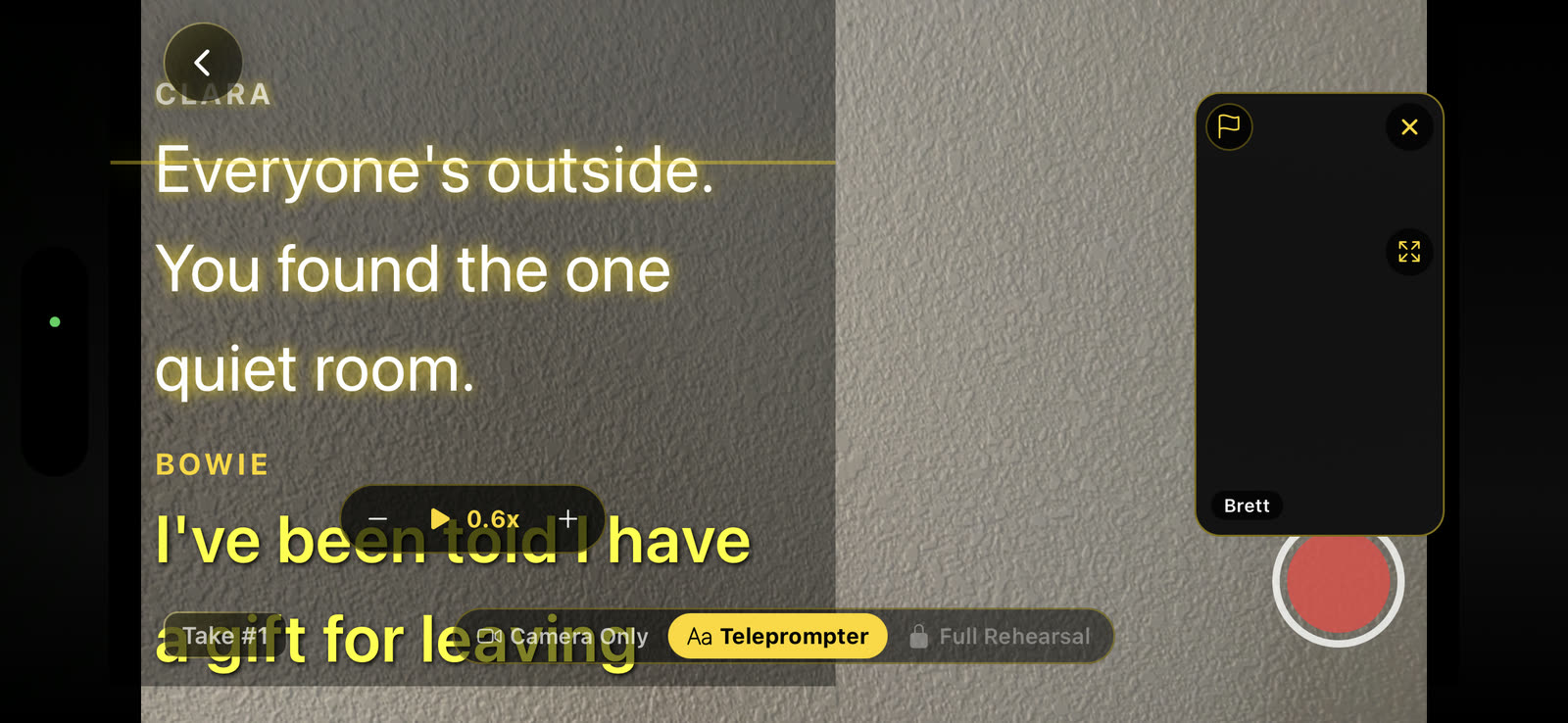
Recording a take in a Live Reader session on iPhone, with your lines over the camera view and the reader's video tile in the corner
Recording a take while your reader is on the call.
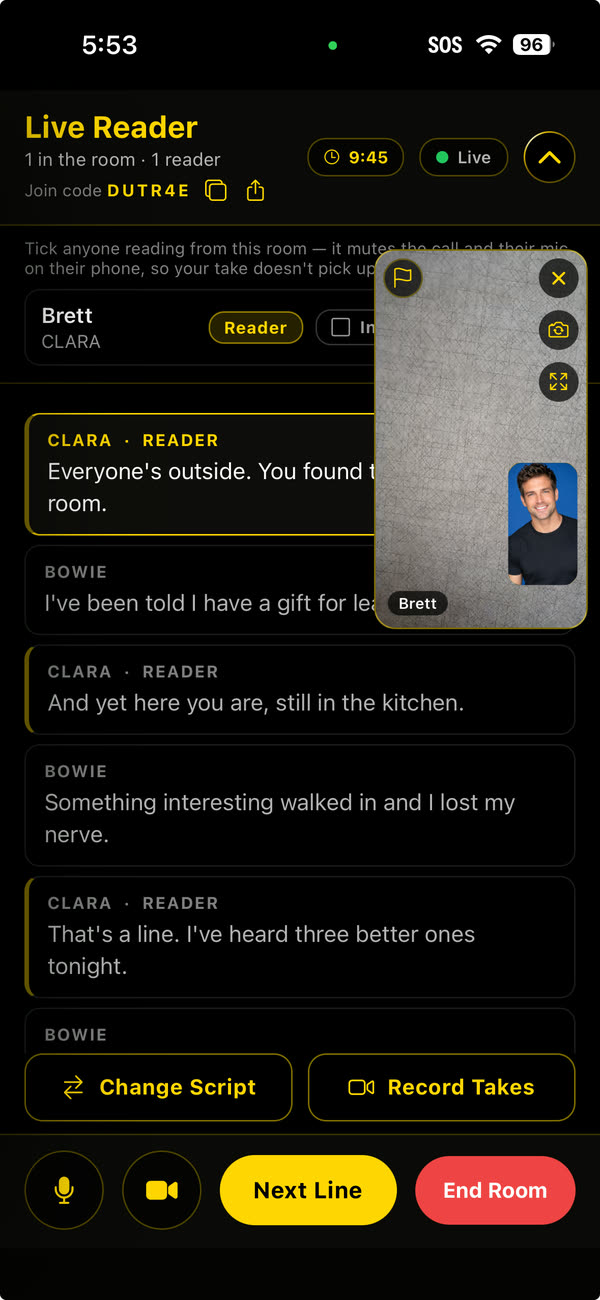
The Live Reader room on iPhone: the join code, the shared script synced line by line, the reader's video and the Next Line button

How a session works

  1. Start a Live Reader room in the app, and ScriptReady gives you a code to share.
  2. Your reader joins on their own phone with the code. They see the same script as you, synced line by line.
  3. They read the other parts live and tap Next Line to move your teleprompter forward.
  4. In a one-to-one session, you record your takes while they read with you.
  • Their voice goes straight into your take

    Your reader's voice is recorded directly from the call into your take, so it sounds clean and close, as if they were in the room with you.

  • Private and invite-only

    Rooms open with a code you share, and there is no public directory or matchmaking. Sessions can be one-to-one or a small group.

  • Always free for your reader

    There's no cost for your reader. When they join, they automatically get a free Collaborator account.

Import

Import your sides in seconds

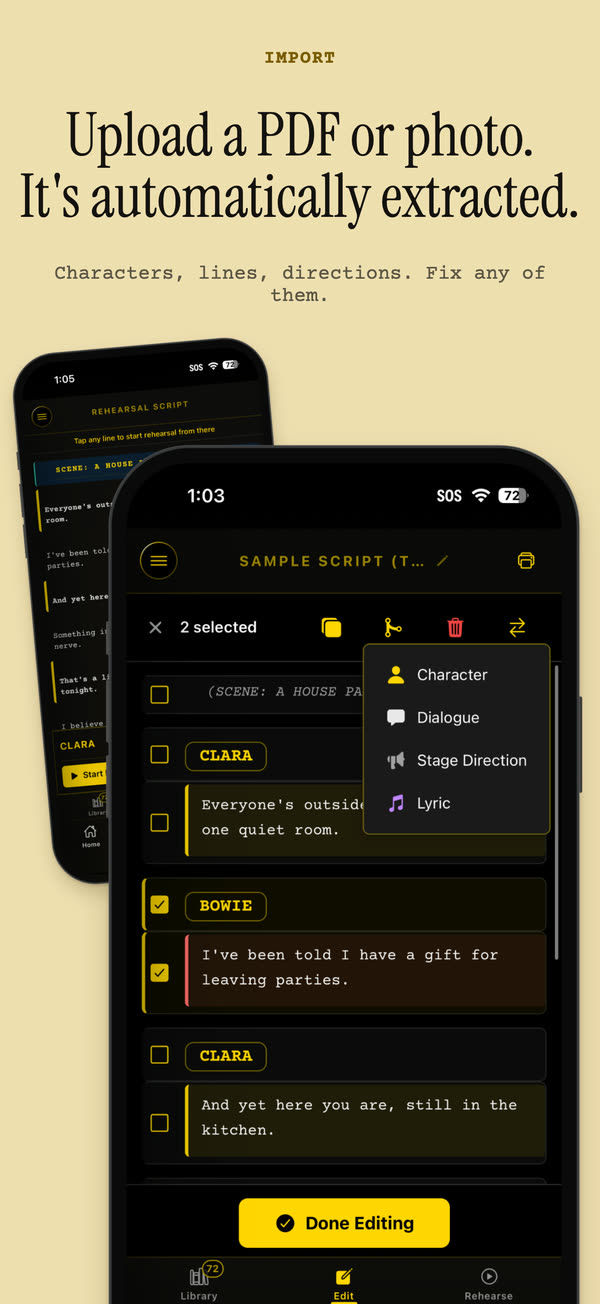
Tap Upload, choose a PDF, a photo of your pages or a Word file, and ScriptReady turns it into a script you can rehearse. There's nothing to retype.

  • Fast. In this recording, a six-page PDF was ready to edit in about four seconds.
  • Accurate. Characters, dialogue and stage directions are sorted for you, even on watermarked audition sides.
  • Simple. Upload, choose your file, Import. If one PDF holds several scenes, ScriptReady offers to split it into separate scripts.
  • Easy to fix. Change a word or a line type in two taps, or select several lines and combine them.
  • View Original opens the pages you imported, so you can check the source any time, even in the middle of a rehearsal.

Speech Recognition

ScriptReady follows along as you say your line. When you finish, your scene partner answers, so you never tap the screen.

Rehearse

Your scene partner comes in when you finish your line

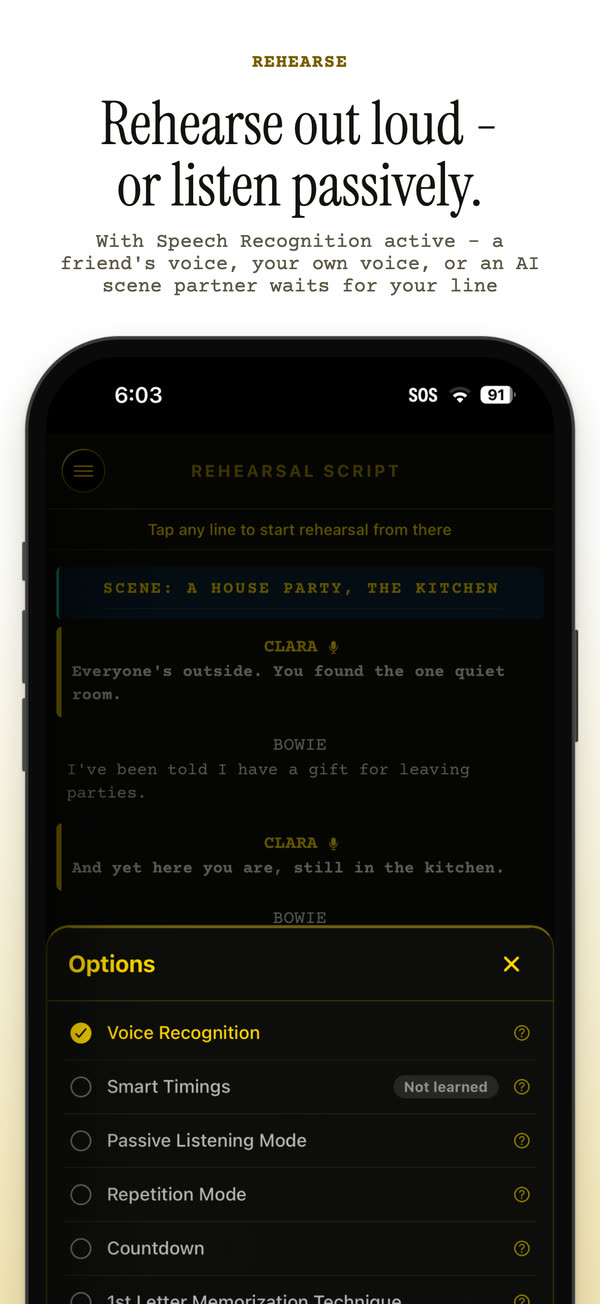
ScriptReady uses Speech Recognition to follow along as you rehearse. When you reach the end of your line, the other character answers, so you never have to tap the screen between lines.

  • To work on one part of a scene, tap any line in the script and the rehearsal starts from there, even in the middle of a run.
  • If you'd rather not use speech recognition, Smart Timings learns how long you take on each line and plays the scene back at your pace, or Passive Listening plays the character voices on repeat so you can learn by ear while you do something else.
  • Set Partner Readback Speed to hear your scene partner's lines faster, up to 2×.
  • Additionally, Repetition, First-letter Memorization and Countdown modes also help you learn your lines.
Why ScriptReady

Help for last-minute self-tapes

Self-tape requests often come with a day's notice, and there isn't always someone around to read with you. Here is how ScriptReady helps in three common situations.

Long distance

Your best reader lives in another city

Usually
You set up a laptop on a video call and try to hold the pages at the same time.
With ScriptReady
Start a Live Reader call, and they read with you in real time from their own phone while you record, moving your teleprompter as they go. If they can't make a call, send them the part with Script Share and their recorded lines become your scene partner. Helping you is free for them.
Live ReaderScript Share

Late at night

You're on your own and the tape is due in the morning

Usually
You read the other part yourself and guess at the timing.
With ScriptReady
Your pre-recorded voice, or an AI partner's voice, reads every other part and waits until you finish each line. When you're ready, you record your self-tape with the other lines playing and yours on screen.
My VoiceAI voicesSelf-tape

On the go

You have a long monologue to learn by Friday

Usually
You cover the page with your hand and check yourself one line at a time.
With ScriptReady
You can drill it with first-letter memorization, repetition or countdown mode, or let passive listening play the scene on repeat through your headphones.
MemorizationPassive listening
Scene partners

Choose who reads the other parts

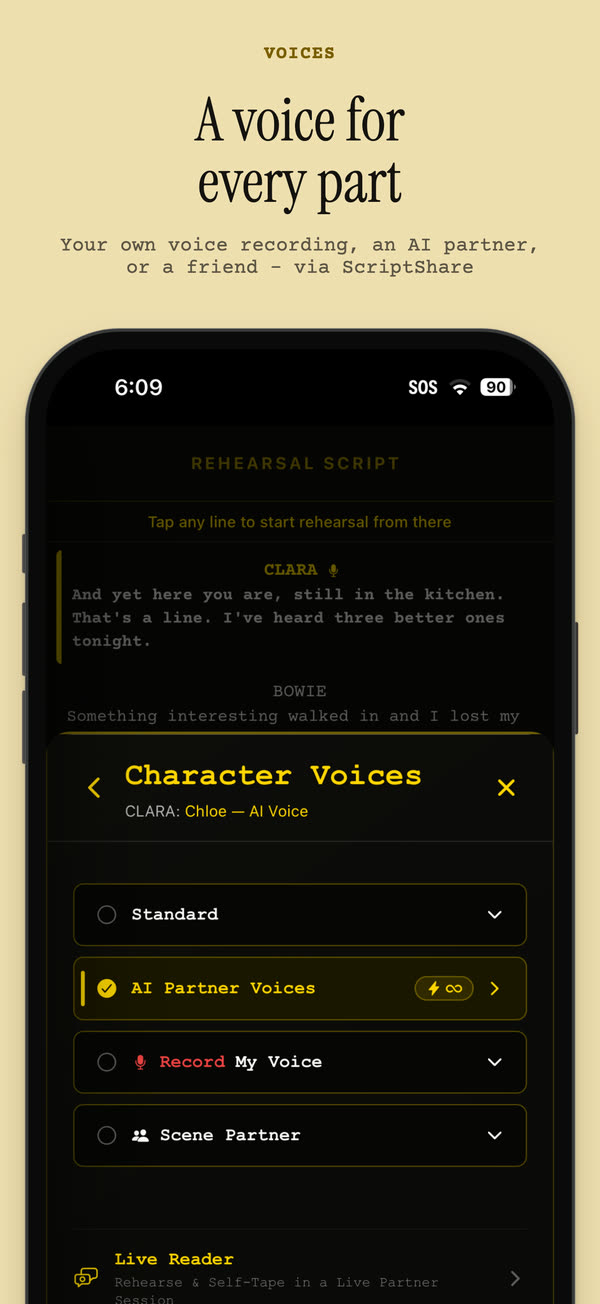
You choose who reads each character. One part can play your own recording while another uses an AI voice or a friend's recording.

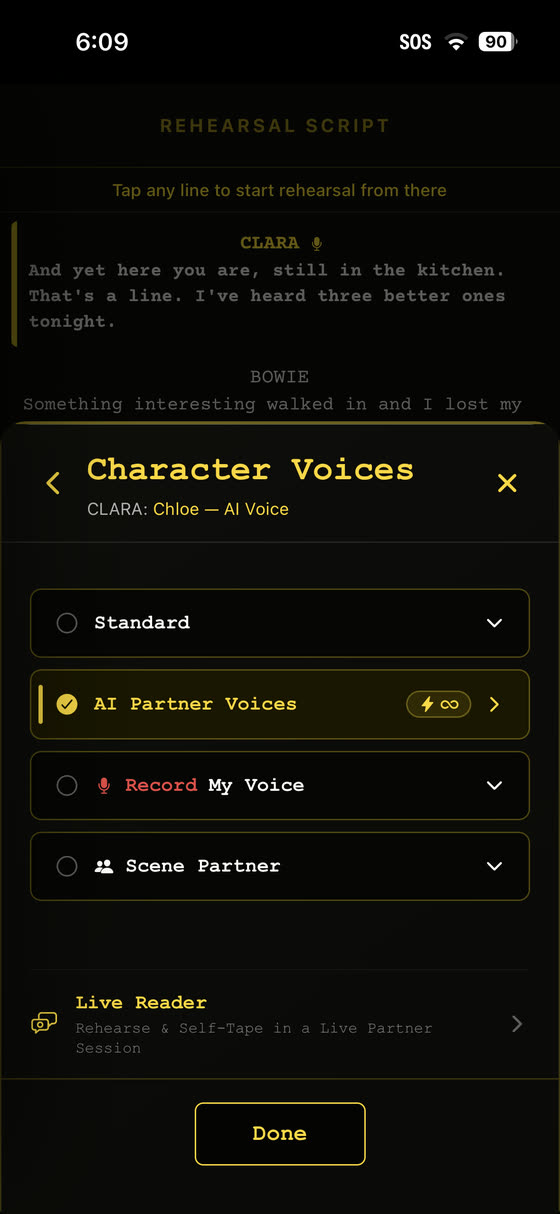
The Character Voices sheet, where you choose your own recording, an AI partner voice or a friend's recording for each character, or start Live Reader
  1. 1

    Live Reader

    Start a private video call with a real reader. They see the same script, synced line by line, and can control your teleprompter from their own phone while you act.

  2. 2

    Script Share

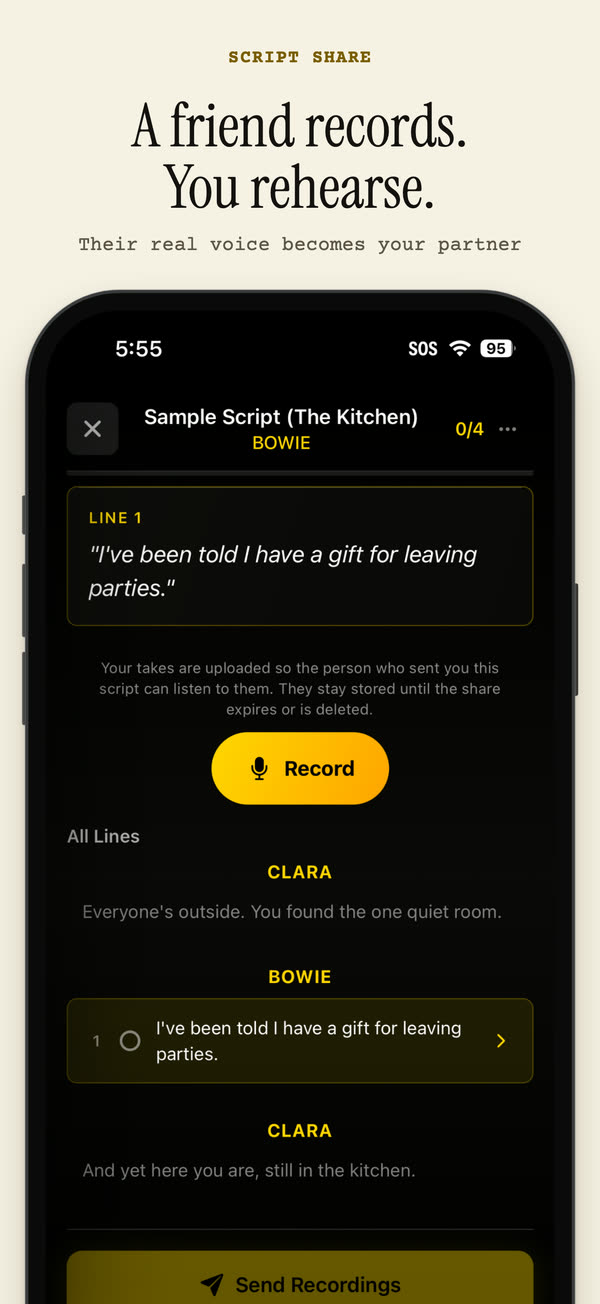
    Send one or more characters to a friend. They record their lines on their own phone, and their voice automatically syncs up to your script to play opposite you whenever you rehearse.

  3. 3

    AI partner voices

    Choose from a curated library of AI voices with different accents and tones to read the other parts.

  4. 4

    Your own voice

    With My Voice, you record your own reading of the other parts, and your recordings play opposite you when you rehearse.

Helping a friend is always free!
Anyone who records lines for you or reads with you on a call only needs a free Collaborator account.

Your voice is never used to train AI.
Your recordings are only used for rehearsing, and the AI partner voices are licensed voices, not copies of anyone who uses the app.

Self-tape and teleprompter

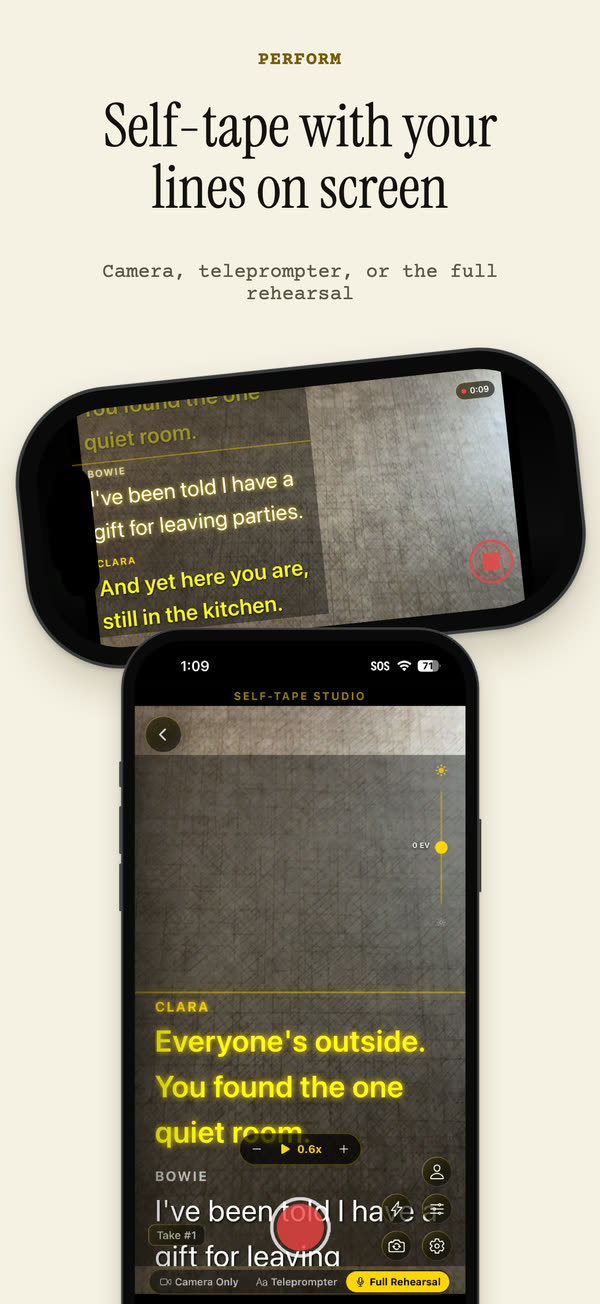
Record your self-tape with your lines on screen

Your lines appear over the camera view, and your takes are saved to your library so you can review them and send the best one.

Camera onlyRecord without any lines on screen.
TeleprompterYour lines scroll over the camera view.
Full rehearsalThe other characters' lines play during the take.

Teleprompter controls

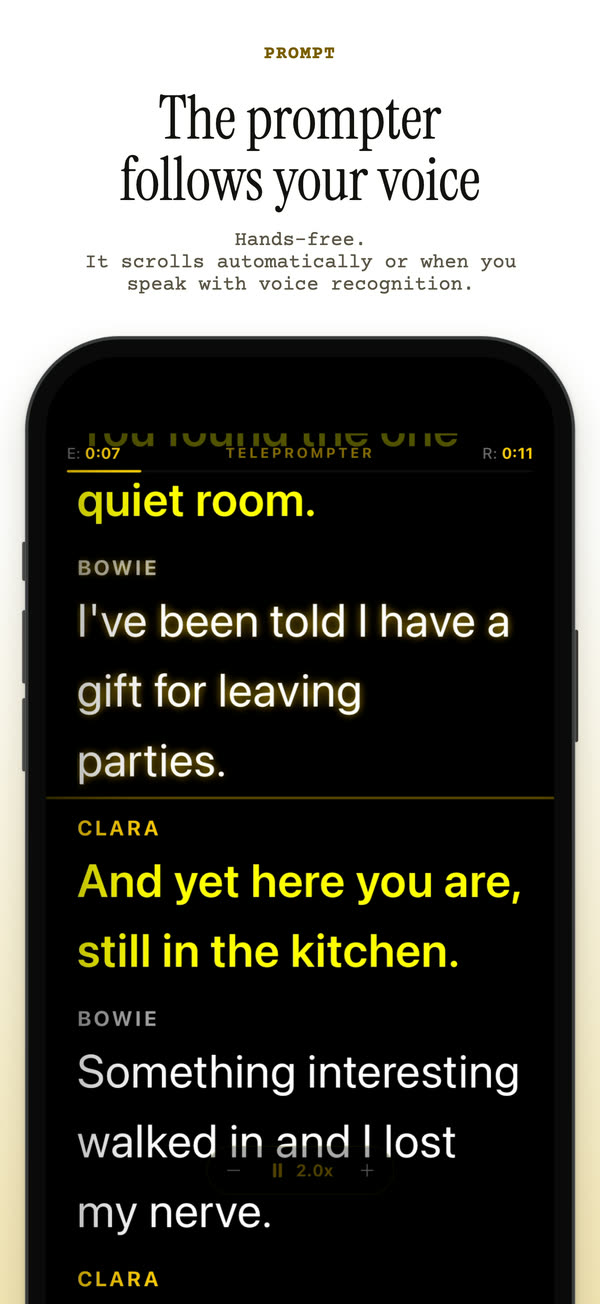
Swipe along either edge to speed up or slow down while it plays, or drag the script in the middle. Pinch to change the text size. The current line stays highlighted. Time Scroll paces the script to finish in a set time, and you can mirror the text.

The teleprompter can float over other apps, so your lines stay on screen while you use another camera or video-call app.*

* Android only

Songs, backing tracks and reverb

Attach a piano accompaniment or backing track and rehearse songs and scenes in order. If you add a countdown, the music starts once recording begins, so you have time to get ready.

After you record a song or a solo self-tape, you can add Vocal Reverb on the review screen. Choose Room, Hall or Plate and set the intensity. Your voice stays clear in front, and the reverb is saved into the take you keep.

Camera features

Up to 4KRecord in 1080p or 4K, depending on your phone.
24, 30 or 60 fpsPick the frame rate the casting request asks for.
CountdownWait 3, 5 or 10 seconds before recording starts.
Ring lightAn on-screen light in white, warm or cool brightens your face on the front camera.
StabilizationSteadies the picture when you hold the phone.
MirrorFlip the front camera image if that's how you like to see yourself.
Screenshots

A look at the app

App Store screenshot: rehearse with speech recognition, or listen passively
Rehearse
App Store screenshot: self-tape with your lines on screen
Self-tape
App Store screenshot: upload a PDF or photo and fix any line
Import and edit
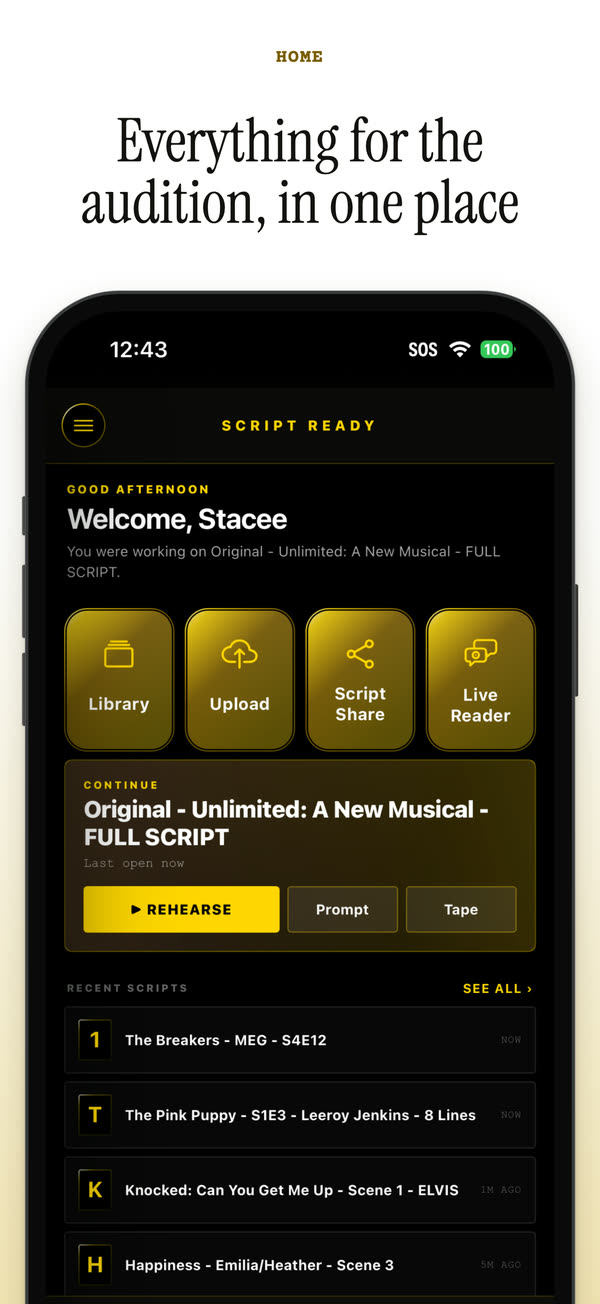
App Store screenshot: the home screen
Home
App Store screenshot: a friend records their lines with Script Share
Script Share
App Store screenshot: choose a voice for every part
Voices
App Store screenshot: the teleprompter
Teleprompter
Features

Everything ScriptReady does

Rehearsing

Voice recognitionThe scene moves on as soon as you finish your line.
Smart TimingsIntuitively pre-save your script timings, allowing you to bypass speech recognition and set your own spacing between lines.
Passive listeningThe scene plays back character voices on repeat so you can listen and learn by ear.
Memorization modesRepetition, first-letter memorization and countdown modes help your lines stick.

Scene partners

Live ReaderA real reader joins a private video call, reads with you live and moves your teleprompter while you record.
Script ShareA friend records their lines on their own phone, and their voice automatically syncs up to your script to play opposite you.
AI partner voicesChoose from a curated library of AI voices with different accents and tones to read the other parts.
My VoiceRecord your own voice, reading any character or role.

Recording

Self-tapeRecord with the camera only, with a teleprompter, or in Full Rehearsal, where your scene partner reads the other lines as you go and their voice is recorded into your take.
TeleprompterSwipe to change the speed, pinch to resize the text, and follow the highlighted line.
Floating teleprompterOn Android, your lines can stay on screen over other apps.
Music and backing tracksAttach a piano accompaniment or backing track, rehearse songs and scenes in order, and add Vocal Reverb to your song takes.

Scripts and account

ImportBring in a PDF, a photo of your pages or pasted text, including watermarked sides.
EditingImported scripts open in the editor so you can check them before you rehearse. Tap any line to fix the text or switch it between dialogue, stage direction and lyric. It only takes two taps.
Create a ScriptWrite your own scene in the app with ease. Tap a character's name, type or dictate the line, and mark it as dialogue, a stage direction or a lyric. Your script is ready to rehearse as soon as you finish.
Print to PDFEasily print any script as a clean copy in screenplay format with your lines highlighted.
Account syncYour scripts and recordings sync across Android and iPhone devices.

How it works

Getting started takes four steps

  1. Step 1

    Add your script

    Import a PDF or a photo, paste the text, or write your own.

  2. Step 2

    Choose your character

    ScriptReady lists the characters in the script. Tap the one you're playing.

  3. Step 3

    Choose a scene partner

    Pick your own recording, an AI voice, a friend's recording or a live reader.

  4. Step 4

    Rehearse and record

    Run the scene as many times as you like, then record your self-tape.

FAQ

Common questions

Is ScriptReady free?

ScriptReady is free to download from the App Store and Google Play. Helping a friend is always free, and anyone who records lines for you or reads with you on a call only needs a free Collaborator account.

Does my friend need to be in the same room?

No. With Live Reader, they join a private video call from their own phone, read with you live and move your teleprompter while you record. With Script Share, they record their lines on their own phone wherever they are.

Can it read watermarked audition sides?

Yes. ScriptReady handles watermarked sides, sorts the script into characters, dialogue and stage directions, and lets you fix any line in two taps.

Do I have to tap the screen between lines?

No. Voice recognition moves to the next line when you finish yours. If you'd rather not use it, Smart Timings plays the scene at your pace.

Does it work on both iPhone and Android?

Yes. Sign in with Google, Apple or email, and your scripts and recordings sync across both.

See all questions

Get ScriptReady

ScriptReady is free to download on iPhone, iPad and Android.

Download ScriptReady on the App Store Get ScriptReady on Google Play

Apple and the Apple logo are trademarks of Apple Inc. Google Play and the Google Play logo are trademarks of Google LLC.